Otter.ai Review: Real-Time Transcription, Action Items, and Where It Falls Short
Fifteen back-to-back calls a week leaves almost nobody with the bandwidth to actually write good notes during any of them. Otter.ai exists for exactly that gap: it joins the meeting, listens the whole way through, and hands you a searchable transcript with the decisions and action items already pulled out. Founded in 2016 by Sam Liang, a former Google and Motorola VP, Otter has grown into one of the more recognized names in AI transcription, now used by upwards of 10 million people across sales teams, students, and enterprise workflows.
The core promise stays simple even as the feature list has grown around it: stop scribbling notes, start actually paying attention to the conversation.

What Otter.ai Actually Does
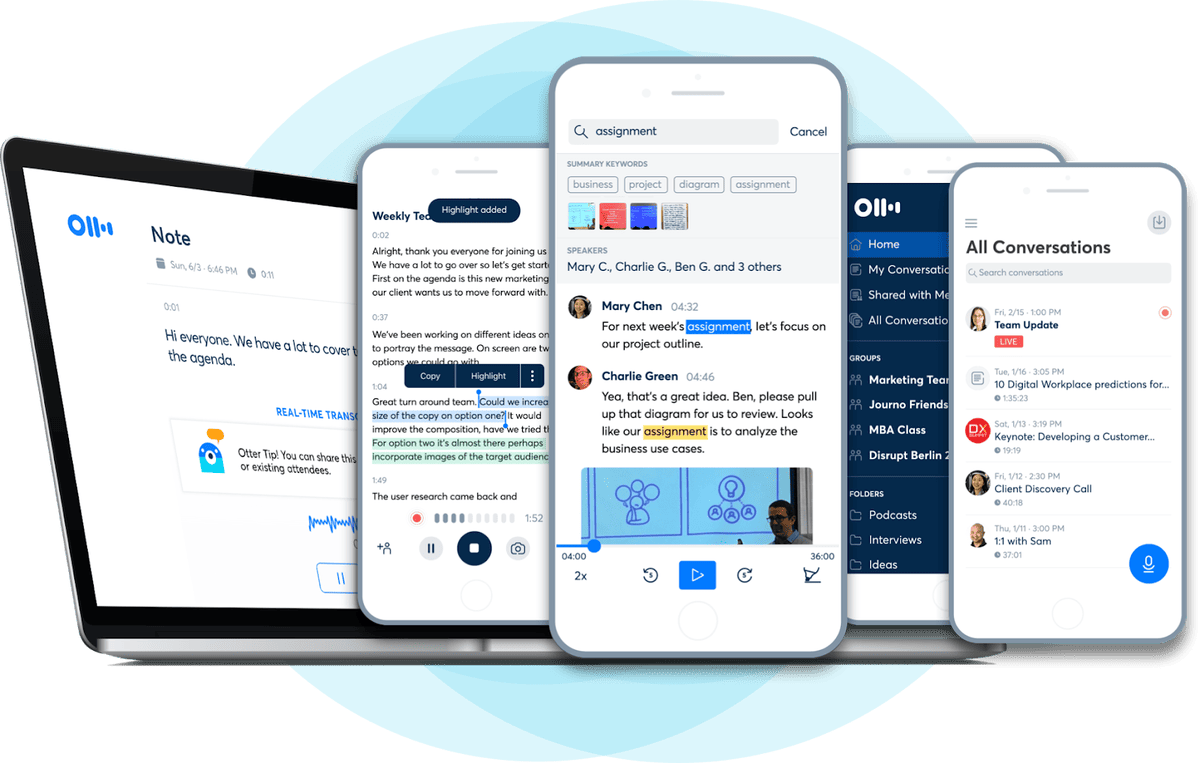
Otter works as an AI meeting assistant that records, transcribes, and summarizes conversations in real time. Sync your Google or Microsoft calendar, and OtterPilot — the product’s flagship feature — automatically joins scheduled Zoom, Google Meet, or Microsoft Teams calls as a bot participant. No one needs to hit record manually; Otter shows up, listens, transcribes live, and sends out a structured summary the moment the call ends.
Speaker recognition adds another layer worth mentioning. After a couple of meetings with the same people, Otter starts correctly attributing who said what roughly 85% of the time, which matters more than it sounds — knowing exactly who committed to a deadline avoids the “I thought you said you’d handle that” problem entirely.
Tools Built Into the App
A handful of features carry most of the day-to-day value:
- OtterPilot – auto-joins scheduled meetings via calendar sync and handles the entire record-transcribe-summarize pipeline without manual setup.
- Live transcription – real-time speech-to-text with over 95% accuracy on clear audio, visible during the call itself, not just afterward.
- Speaker recognition – distinguishes voices in multi-person conversations after a short training period.
- Otter AI Chat – ask natural-language questions across your entire meeting history, like “What did Sarah say about the budget?” and get a sourced answer pulled from past transcripts.
- Automated summaries and action items – every meeting ends with a clear breakdown of decisions and next steps, no manual follow-up email required.
- Bot-free capture – record directly from a device microphone for in-person meetings, interviews, or lectures where there’s no calendar link to join.
- Chrome extension – transcribe Google Meet without a visible bot, plus YouTube videos, podcasts, and any audio playing in a browser tab.
- MCP Server – lets tools like Claude and ChatGPT securely pull from your Otter meeting archive for deeper analysis, a newer addition aimed at technically minded teams.
Business and Enterprise tiers add Slack integration, CRM syncing through OtterPilot for Sales, and admin-level security controls including SOC 2 Type II certification and HIPAA compliance.
Why People Rely On It
The biggest draw is simply getting your attention back during a call. Instead of half-listening while typing notes, you can stay fully present and trust that Otter caught the details — several users specifically describe the shift from “scribe” to actual participant as the thing that sold them on the tool.
Otter AI Chat pushes that value further for anyone juggling multiple client relationships or ongoing projects. Searching “what did the supplier say about lead times” across months of past calls beats scrolling through transcripts manually, and it turns what used to be scattered meeting notes into something closer to a searchable knowledge base.
Accessibility use cases matter here too, and they’re easy to overlook. Students using Otter as a classroom accommodation describe genuinely changed academic experiences — no longer losing the thread during a lecture, and always having a transcript to fall back on when an assignment’s verbal instructions get fuzzy later.
Who Should Use Otter.ai
- Sales and account teams that want supplier or client calls searchable months later without re-listening to recordings
- Students and professionals who need real-time captions during lectures or meetings, including as an accessibility accommodation
- Remote teams running frequent Zoom, Google Meet, or Microsoft Teams calls who want automated summaries instead of manual note-taking
- Journalists and researchers transcribing interviews into searchable, shareable text
- Anyone tired of writing follow-up emails by hand after every call
Teams needing heavy multilingual support or unlimited transcription minutes might find Otter’s language coverage and monthly minute caps more limiting than competitors like Fireflies, so it’s worth checking those specifics against your actual workload first.
How to Set Up and Use Otter.ai
- Download the app from the App Store, Google Play, or install the desktop and Chrome extension versions.
- Create an account and connect your Google or Microsoft calendar so OtterPilot can auto-join scheduled meetings.
- Choose your capture method — send OtterPilot to a virtual meeting, record bot-free on desktop for an in-person conversation, or use the Chrome extension for browser audio.
- Let the meeting run while Otter transcribes live; you can glance at the running transcript on screen if you want to follow along.
- Review the summary after the call ends, checking the auto-generated action items and key decisions for accuracy.
- Edit the transcript if speaker attribution or specific lines need a manual fix.
- Search past meetings using Otter AI Chat whenever you need to recall something specific from an earlier conversation.
- Share or export the notes to your team through Slack, Google Docs, or your CRM, depending on your plan.
Most first-time users notice the biggest improvement in speaker accuracy after Otter has sat through two or three meetings with the same group of people.
Final Thoughts
Otter.ai solves a problem almost everyone in back-to-back meetings quietly struggles with: staying present in a conversation while still capturing everything worth remembering from it. Between OtterPilot’s automatic joining, real-time transcription, and a searchable chat layer across your entire meeting history, the tool trades manual note-taking for something closer to a permanent, queryable record of every call you’ve had.